Wiggle Square 1 Clay Cutter - Mid Century: Integrating Digital STL Files into Your Creative Workflow
The Wiggle Square 1 Clay Cutter - Mid Century represents a specific intersection of retro aesthetics and modern digital fabrication. For makers, small business owners, and hobbyists utilizing polymer clay, ceramic, or culinary mediums, this tool is not merely a shape; it is a foundational asset in a broader production workflow. As a digital download STL file bundle, it shifts the traditional procurement process from waiting for physical shipping to immediate local manufacturing. This transition requires a shift in how creators plan, prepare, and execute their projects, moving from passive consumption to active production management.
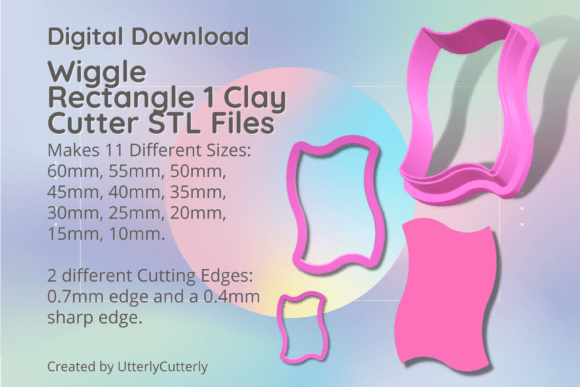
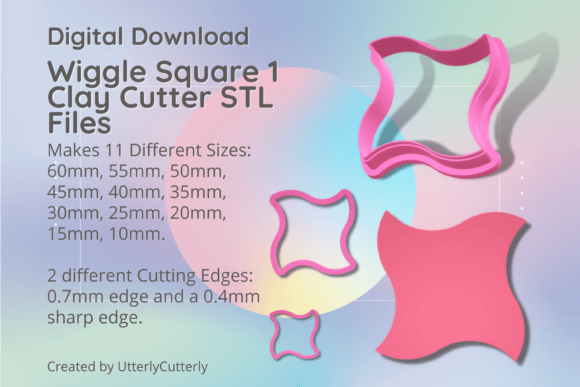
Understanding where this asset fits into your ecosystem is essential for maximizing efficiency. The Wiggle Square 1 is designed for versatility, serving as a primary forming tool during the initial shaping phase of jewelry making, cookie decorating, or fondant work. However, its utility extends beyond simple cutting. By offering eleven distinct sizes ranging from 10mm to 60mm, it facilitates scalable design systems. A professional creator can use the 60mm version for statement pendants while utilizing the 15mm or 20mm variants for matching earring studs or charm accents within the same collection. This size gradation allows for cohesive product lines without the need to source multiple disparate tools, streamlining both the design phase and inventory management.
Selecting the Right Cutter Profile for Material Compatibility
A critical aspect of integrating these STL files into your workflow is selecting the appropriate cutter geometry for your specific material and desired finish. This bundle includes two distinct cutting edge profiles, each engineered for different outcomes. Understanding the technical specifications prevents print failures and ensures the final product meets quality standards.
- Standard Edge (0.7mm Wall): This profile features a 0.7mm wall thickness with a 3mm thick base and a 12mm height. It is optimized for durability and ease of printing. In a production environment, this is often the preferred choice for softer clays, fondant, or cookie dough where extreme sharpness is less critical than tool longevity. The thicker wall reduces the risk of layer separation during high-volume use and is generally more forgiving if your printer’s flow rate is not perfectly calibrated.
- Sharp Edge (SE): Abbreviated as SE in the file names, this variant utilizes a 1mm support wall tapering to a precise 0.4mm cutting edge. Like the standard version, it maintains a 3mm base and 12mm height. This profile is essential for polymer clay jewelry where clean, crisp edges reduce post-processing time. The sharper bevel slices through conditioned clay with less resistance, minimizing distortion. However, it requires precise bed leveling and optimal extrusion settings to print successfully without clogging or under-extrusion at the tip.
When planning a new project, assess your material's viscosity and your post-processing capacity. If you intend to sand and refine every piece, the Standard Edge may suffice and will last longer. If you aim for "as-cut" perfection to minimize labor hours per unit, the Sharp Edge is the necessary investment in setup time.
Digital Asset Management and Print Preparation
Treating STL files as industrial assets rather than disposable downloads improves long-term workflow consistency. Upon downloading the Wiggle Square 1 bundle, immediate organization is recommended. Create a structured directory system that categorizes files by size and edge type. Since the sizes are measured from the longest ends (60mm, 55mm, 50mm, 45mm, 40mm, 35mm, 30mm, 25mm, 20mm, 15mm, 10mm), naming conventions should reflect this metric clearly to avoid confusion during rapid selection at the printer.
Before adding these files to your print queue, verify compatibility with your specific 3D printer’s capabilities. The 0.4mm cutting edge on the SE variants pushes the limits of standard 0.4mm nozzles. Users with worn nozzles or inconsistent first layers should perform a test print of the smallest size (10mm) before committing to a full batch. This quality control step identifies calibration issues early, saving filament and time. Additionally, because the base is consistently 3mm thick across all variants, you can create a universal slicer profile for this product line, further reducing setup friction for future prints.
Embossing Considerations and Material Thickness
For users incorporating texture or depth, note that any embossing lines within these designs are 1.5mm tall relative to the cutting edge. This specification dictates your material preparation workflow. To achieve a clear impression without bottoming out or tearing the material, your rolled clay or fondant must be thicker than 1.5mm. Integrating this constraint into your rolling process ensures consistency. Using spacer rings or a pasta machine set to a specific gauge becomes part of the standardized operating procedure when using the Wiggle Square 1 cutters, ensuring that every cut yields a usable result.
Workflow Integration Across Different Mediums
The versatility of the Wiggle Square 1 Clay Cutter - Mid Century lies in its cross-disciplinary application. However, the workflow differs significantly depending on the medium. Adapting your technique to the tool’s specifications ensures optimal results whether you are crafting wearable art or edible decorations.
Jewelry and Polymer Clay Production
In jewelry making, the mid-century wavy square aesthetic serves as a standalone design element or a frame for mixed media. When using the SE files, condition your clay thoroughly to prevent drag marks. The 12mm height of the cutter provides ample clearance for lifting the tool without disturbing the shaped clay, but it also acts as a handle. For production runs, consider printing multiple sizes simultaneously to maximize bed space. After cutting, the uniform 3mm base thickness allows for consistent pressure application, which is vital when creating sets of earrings that must match in dimension. Because new STL files are added to the store weekly, this cutter can be paired with future releases to build an expanding, interoperable library of shapes that share similar design languages.
Culinary and Fondant Applications
For bakers and cake decorators, food safety and hygiene become the primary workflow concerns. While the STL files are identical, the post-print processing differs. Printed cutters used for food should be sealed with a food-safe epoxy or used exclusively with a barrier like plastic wrap, as FDM printed parts have layer lines that can harbor bacteria. The Standard Edge (0.7mm) is typically superior for cookies and fondant; the slightly rounded edge prevents sticking and tearing in soft doughs. The range of sizes allows for tiered cake decorations or graduated cookie sets. In this context, the digital nature of the product allows for on-demand replacement; if a cutter is damaged or lost in a busy kitchen, a replacement can be printed overnight rather than ordered.
Scaling and Customization Strategies
Owning the digital source file grants flexibility that physical tools cannot offer. Advanced users can modify the STL files to suit niche requirements before printing. While the provided sizes cover most needs, you might require a 48mm cutter for a specific template. Most slicers allow for uniform scaling; however, be aware that scaling affects wall thickness. Scaling down a Standard Edge cutter by 50% reduces the wall to 0.35mm, which may be unprintable. Conversely, scaling up a Sharp Edge cutter increases the cutting edge width, potentially reducing its effectiveness. Understanding these relationships allows for intelligent customization without compromising structural integrity.
Furthermore, the ability to curate custom combos enhances creative agility. You are not locked into a manufacturer’s predetermined set. By combining the Wiggle Square 1 with other geometric or organic STL files from the same ecosystem, you can develop proprietary shape combinations that differentiate your brand. This modularity supports a lean inventory model where tools exist only as data until they are needed, reducing physical storage requirements and upfront costs.
Maintenance and Long-Term Utility
Digital tools require digital maintenance. Keep your original STL files backed up in cloud storage or an external drive. Printer firmware updates or slicer changes can sometimes affect how older files process, so retaining the source geometry allows for re-slicing with updated parameters. Physically, PLA cutters are sensitive to heat. Store them away from direct sunlight and hot clay conditioning equipment to prevent warping. If a cutter loses its edge over time, the cost of reproduction is merely the price of filament and electricity, making the Wiggle Square 1 Clay Cutter - Mid Century a sustainable, low-overhead asset for continuous creative production.
Ultimately, successful integration of this tool depends on recognizing it as a component of a larger system. From file organization and printer calibration to material selection and post-processing, each step influences the final outcome. By approaching the Wiggle Square 1 not just as a novelty shape but as a precision instrument within a disciplined workflow, creators can achieve professional consistency and expand their creative capabilities with confidence.